In link selling, we’re all trying to have the best possible site to justify a high price on our articles. And the metric we work on most, the one that really drives the rate up, is traffic.
Good news for everyone who pulls it off: that traffic is worth more than what it earns you today. Because once the link price is justified, it’s no longer good for anything. People show up, they read, they leave.
And very few people really take advantage of it.
Last week I tested a second way to monetize these sites, by selling leads, on the ones in my portfolio whose topic lent itself to it.
I’m giving you everything: the results, the method, the skill I gave my agent to set everything up, and the WordPress plugin I built for the occasion.
In short:
- On lead platforms, some topics are in high demand. Sites in my portfolio already cover those subjects.
- I used an AI agent to find the relevant sites, then to find the right pages within those sites. The second step is what makes the difference.
- First quote request sold one hour after going live. In nine days: 14 requests kept, 88% accepted.
- The platform is called Leadrs. Seller sign-up is free and you can see the demand before creating anything: open a seller account.
- The WordPress plugin I wrote is free, available to download in the community where we talk about this, along with the skill for the agent.
- The links to Leadrs are referral links: I earn a commission if you open your account through them. Sign-up stays free and the price of your leads is the same. I’d rather say so right away.
I’m running an open discussion about this test in the community: the details, up-to-date numbers, and results from people trying it on their end. The community is for registered members only, it’s free and takes thirty seconds. Join the community
1. Traffic justifies the price. Then what?
The logic of link selling is simple. You publish, you work on your SEO, your site gets visitors, and you can charge more for a sponsored article.
So traffic is a sales argument. It drives the price up, and that’s already pretty good.
But it’s a shame to stop there. These visitors are here, they’re real, and they’re looking for something specific. Someone reading a heat pump comparison in August 2026 has a project, a rough budget and a home.
That person is worth €20 to €27 to an installer, depending on the sector. And for now, they leave without me having offered them anything.
Hence the idea for the test: can I add a second revenue stream to these sites without touching the content or the link prices?
2. I started by looking at demand, not my sites
That’s the first move I’d recommend to anyone who wants to try this.
On a lead platform, there are open orders: buyers looking for a given type of contact, in a given sector, at a given price. Everything is visible before you create anything.
So I listed the topics that actually had buyers on the other side, with their prices. That keeps you from building a form in a sector where nobody buys, which earns nothing even with lots of traffic.
Only then did I look at my portfolio, to see which sites covered those subjects.
You can do this first sort without installing anything: open orders are visible as soon as you sign up as a seller, which is free. See the demand on Leadrs
3. Find the right sites, then the right pages
This is where I made a mistake, and it’s the most instructive part of the test.
I started by filtering my sites on the “renovation” topic. The list spat out restaurant and veterinarian blogs.
At first I thought it was a bug. It wasn’t: those sites do talk about home improvement, in 3 articles out of 200. A site’s recorded topic is an average, and three articles out of two hundred carry no weight in it.
The worst part was elsewhere. Pizzeria, hotel and childcare sites each have one article on heat pumps or solar panels. That one article, all alone in the middle of something else, performs very well. My filter was making me miss them.
Hence the real rule: it’s not the site that matters, it’s the page.
So I did the work in two steps with an AI agent. First, spot the sites covering the topics in demand. Then, within those sites, find the pages truly focused on the need: “heat pump price,” “solar panel quote,” that kind of thing.
Out of 35,452 articles, only 224 pages end up carrying the form, less than 1% of the portfolio.
Exactly how we spot these pages, and how we weed out false positives like “heat pump dryer”: it’s all detailed in the community. Open the discussion
4. Two ways to place the form
For this I wrote a WordPress plugin. It does two things depending on the page.
On a well-targeted page, the form is embedded directly at the top of the article. The reader is looking for a price, they land on a quote form, it makes sense.
On the other pages, the ones that discuss the subject without being really specific, nothing appears in the article. The form waits for a trigger, and that trigger isn’t the same on every device.
- On desktop: the moment the mouse moves up toward the top of the screen, toward the tabs. That’s the gesture you make right before closing the page or going elsewhere. A window opens at that instant, with the form.
- On mobile: there’s no mouse, so reading serves as the signal. Past 60% of the article, a discreet banner appears at the bottom of the screen.
- In both cases, if nothing has happened after 75 seconds on the page, the banner shows up anyway.
And there’s one condition before all that: the visitor has to have made a real gesture, a click, a turn of the mouse wheel or a keystroke. Without it, nothing ever shows up. That’s exactly what keeps out search engine bots, which run JavaScript and scroll the page but never produce any of those gestures.
The difference matters more than it seems. Slapping a heating quote form under a pizzeria menu earns nothing, clutters the site, and lowers your seller reputation with every rejected lead.
So the plugin decides page by page, and it’s adjustable.
5. The results after nine days
- First lead the same day, one hour after the first site went live
- 15 quote requests received, 1 rejected, so 14 kept
- 7 already sold for €152.72, 7 still pending
- At the observed average price, the 14 represent about €305
- Acceptance rate: 88%. Average price: €21.82
- These requests come from 7 sites out of the 95 equipped
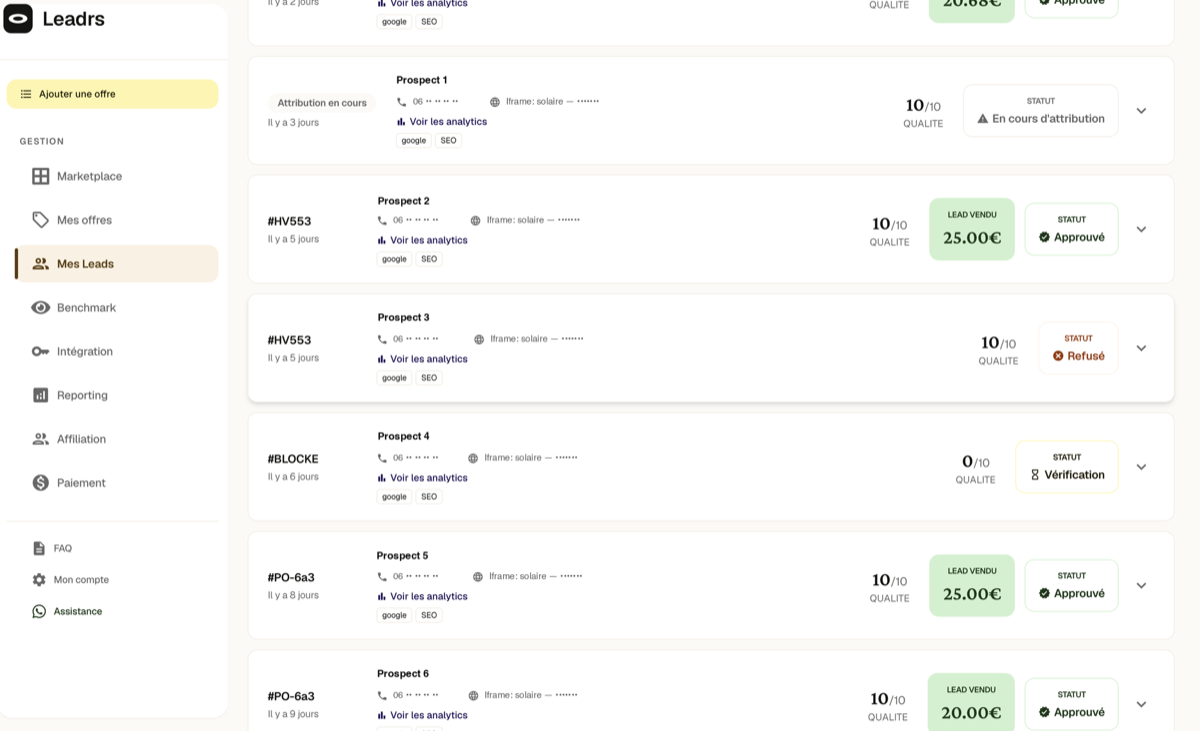
Let’s be clear: €305 in nine days isn’t life-changing. I’m not going to tell you otherwise.
What interests me is that it comes from just seven sites, out of the 95 I equipped. Those seven already existed, they were already getting these visitors, and they weren’t earning anything extra the week before. The other 88 haven’t produced anything at all yet.
And the 88% acceptance rate tells you something useful: contacts coming from organic search pass quality control just as well as those from a paid campaign. They’re not just browsing.
One clarification, because you’ll go looking for it: of the 14 requests, 7 are sold and 7 are still pending. So the €305 is a calculation at the average price, not money in the bank. And nothing is paid until the 48-hour dispute window has passed.
If you want to see what this would look like for you, start by opening a seller account and looking at the sectors in demand. It’s free and there’s no commitment. Create my seller account
Do these numbers speak to you, or leave you skeptical? I’m interested in both. Come discuss it in the community
6. What the AI agent did, and what I did
This test fits into a week because I didn’t do it by hand. By hand, equipping 95 sites takes several weeks.
I described the work to an agent, and it did it. It counted the relevant articles directly in the sites’ databases. It read the platform’s open orders before creating anything. It created the 152 forms via API. It installed everything, cleared the caches, and checked live that the served page actually contained what it was supposed to.
What was left for me was deciding: which sites deserve what, at what price, and which ones get nothing anywhere except on their relevant page.
And once the procedure is written down, it can be replayed. The same document was used for site 3 and site 95, and going from 46 to 95 sites took me one evening.
7. The four things that wasted my time
Three out of four made me think it wasn’t working when it was working just fine.
For two hours I thought nothing was showing up. Actually everything was working, but two caches in a row were still serving the old page. And both of my ways of checking were lying to me, each in its own way. So remember to clear your caches if you hit a similar problem, before looking elsewhere.
I sold my leads at a 30% discount without knowing it. I’d set a floor price thinking it was a rejection threshold. It’s actually very often the price paid, as the platform’s founder confirmed to me afterward. So check the prices on open orders before setting your floor, it takes two minutes.
I almost gave up over a bad measurement. My table of ranking pages told me 4 sites were relevant, when it only keeps the top 50 pages of each site. Counting directly in the databases, I found 100. So if a tool tells you there’s nothing to find, check what it’s really looking at before believing it.
And my tests were green when they weren’t testing anything. They checked that the code was listening for visitor actions, not that the form was showing up. I rewrote them to count the elements actually added to the page, and two cases turned red. So test what shows up on screen, not what the code is supposed to do.
The details of each of these mistakes, with the command that lets you spot them, are in the community. See the full method
8. If you want to try
- Look at demand first. Open the platform’s open orders, note the sectors that have buyers and their prices.
- Look for pages, not sites. You’ll be surprised where they’re hiding.
- Fill in your billing info and connect your payment account right away. Otherwise you’re producing leads for free. It’s silly, and it happens a lot.
- Set your floor price at market level, not below it just to be sure you sell.
- Start with five sites, wait a week, look, then expand. That’s what I did: six sites first, then 46, then 95.
The platform I use is called Leadrs. Seller sign-up is free, and you can look at the demand before deciding anything. Create my seller account on Leadrs
Reminder: referral link. I earn a commission if you create your account through it, sign-up stays free and the price of your leads is the same.
What’s next, and the plugin
I’m going to keep testing. I still have two things to measure, and those are the real questions.
How many leads find a buyer. A lead nobody buys is worth nothing, and a rejected lead damages your reputation. The number produced, on its own, means nothing.
How far demand goes. The day I checked, buyers were looking for about fifty leads across the whole platform. My 95 sites can produce ten times that. It’s not the raw material that’s lacking, it’s the buyers.
In the meantime, I’m already sharing what exists: the WordPress plugin, the skill to give your AI agent so it handles the setup on its own, and the full method. All three are free.
The plugin automatically spots the relevant articles, picks between the embedded form and the exit offer, and never shows anything to search engine bots. It stays off until you’ve configured it, so installing it changes nothing on your site.
The plugin, the agent skill, the detailed method and answers to your questions are in the community. You need an account to access it, and it’s free. Get the plugin and the skill
And if you test on your end, post your numbers, especially if they’re bad: that’s where we learn the most. We’ll move faster together than if each of us repeats the same four mistakes.
To get started, two things
1. Open your seller account and look at the sectors that have buyers. It’s free, and it’s what tells you whether it’s worth it for you: create my account on Leadrs.
2. Get the plugin and the skill in the community, so you don’t start from scratch.